Install as App
It's possible to install this website as an application on your mobile or desktop. Please click on the supported browsers below and follow the intructions.
Supported Browsers
Platform: Windows / Mac / Android



Click on the button to install the App.
iOS + Safari
Platform: iOS
Install this app on your iPhone in four quick steps.
-
1
Menu
Tap the menu button at the bottom right

-
2
Share button
Tap the Share button (📤) at the bottom of the screen

-
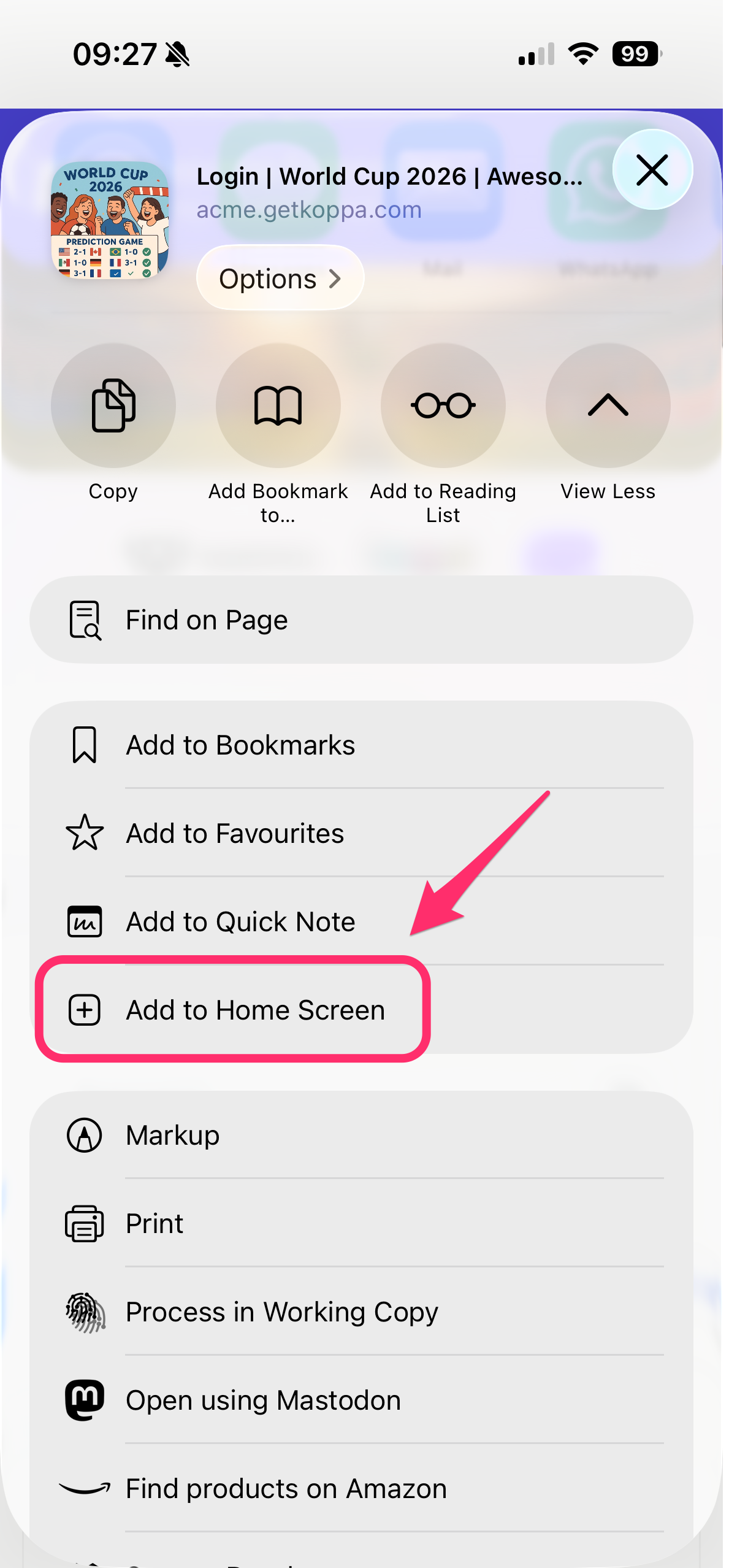
3
Add to Home Screen
Scroll down and tap “Add to Home Screen”
-
4
Add
Tap “Add” in the top right

✅ Done! The app will appear on your home screen.
⚠️ Don’t see the option? Make sure you’re using Safari.
Official Apple instructionsAndroid + Firefox
Platform: Android

You can add this app to your Android Home Screen for quick access to the site.
-
1
Menu
From Firefox, tap the Settings button, then tap Add to Home Screen.
-
2
Home Screen
The icon appears only on the device where you add it.
Other Browsers
Platform: -

Other browsers are not supported.